The exact requestBright living room corner Do not add any text, label or logo that is not already on the product.
Try it on your own photo in Plant & Flower Photos →Before and after
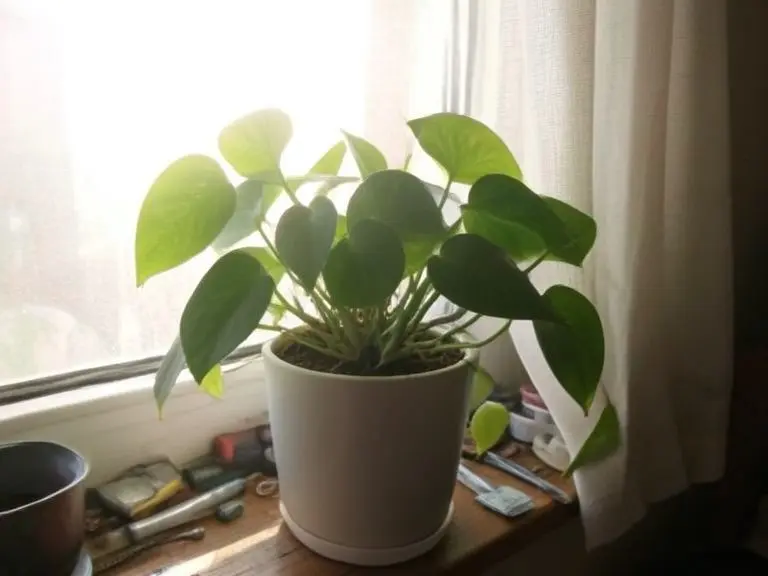
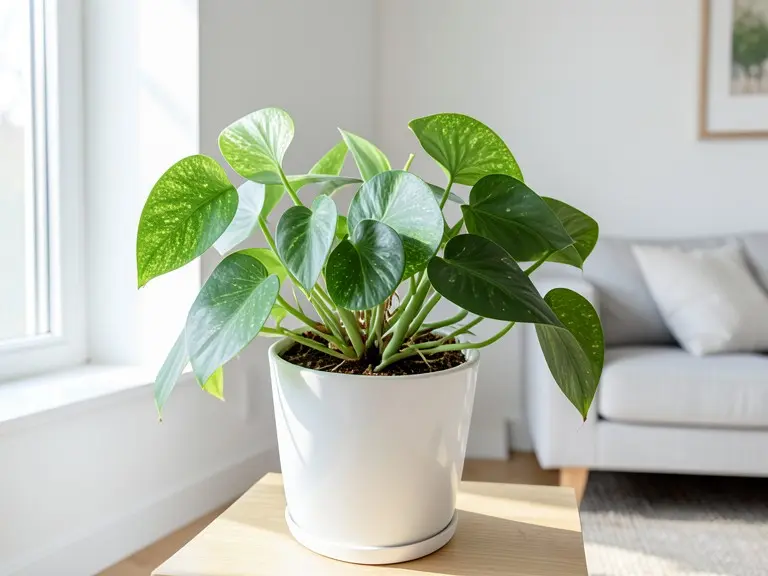
A pothos in a white pot on a messy windowsill, backlit and hard to read, then the same plant in a bright, calm room. The picture is lovely, and one change in it matters a lot if you sell plants.
Made 21 October 2026
The exact requestBright living room corner Do not add any text, label or logo that is not already on the product.
Try it on your own photo in Plant & Flower Photos →The before photo is a phone-style snapshot of a generic product that we made with an AI image model for this page; it is not a customer photo. The after is the unedited result of our own free tool on that photo, made on 21 October 2026 at the size a visitor gets and shown without the download mark. One run, one result: yours will differ.
Plants love windows and cameras do not. With the sun behind the plant, the camera exposes for the glare, so the leaves turn dark and flat and the edges glow. A curtain, a pile of small tools and a mug on the sill fill the rest of the frame, so the eye lands on the clutter.
A plant seller needs the opposite: even light on the leaves, a clear view of the pot and a background that does not compete with them.
We asked for a bright living room corner. The plant now sits in the same plain white pot on a light wooden stool, with a white wall, a window at the side and the arm of a sofa behind. The front lighting shows the leaves as a clean mid-green, and the dark soil line at the top of the pot is kept.
This kind of shot suits plants for people who want to picture one in their own home. It is less useful when the buyer wants to judge the exact plant they will receive.
In the original, the leaves were plain green. In the result, many carry pale speckles, like a different pothos variety. The model did not need to do that, and it shows how an image model can alter the very feature people buy plants for: leaf color, pattern and size.
Plants vary from one pot to the next, so a listing photo is always a little bit of a promise. Showing a tidy room helps with mood. Keep one honest picture of the actual plant, close up, so the customer knows what arrives.
Free tools for this
FAQ
It kept the overall shape and the pot in this example, but it changed the leaf pattern. Always compare leaves with the real plant before you publish.
You can try. Fine details such as petals, spines and tiny leaves are harder for an image model, so check the result closely.
It still worked here, but lighter, front-facing input gives the model more to keep. Step away from the window and the leaves show their real color.
The plant photography guide linked below covers light, background and angles for shooting plants yourself.
Z Product AI makes the tools shown here. Third-party pages above were read for general background on what to check in AI product photos as of 21 October 2026.