The exact requestLit candle, cozy evening Do not add any text, label or logo that is not already on the product.
Try it on your own photo in Candle Photos →Before and after
A plain candle in a glass jar, photographed on a cluttered counter, and the same candle after one request to our candle photo tool. Here is what improved, what the model made up, and what you would check before listing yours.
Made 21 October 2026
The exact requestLit candle, cozy evening Do not add any text, label or logo that is not already on the product.
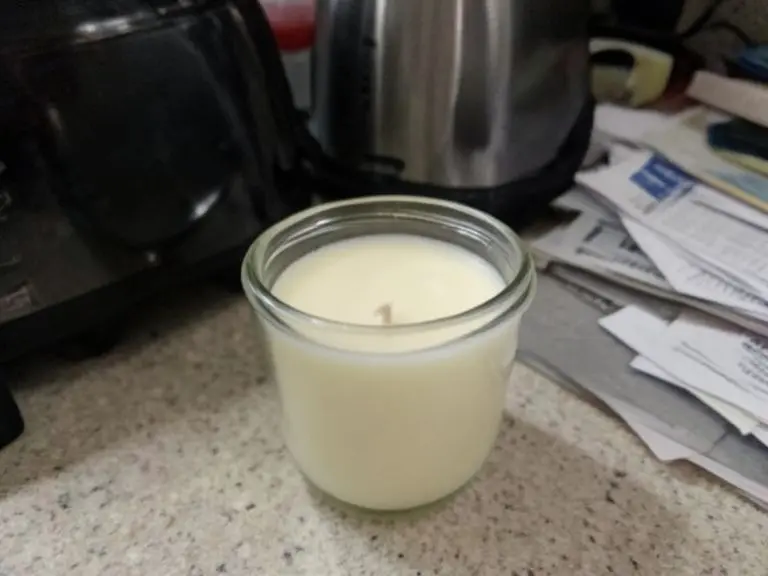
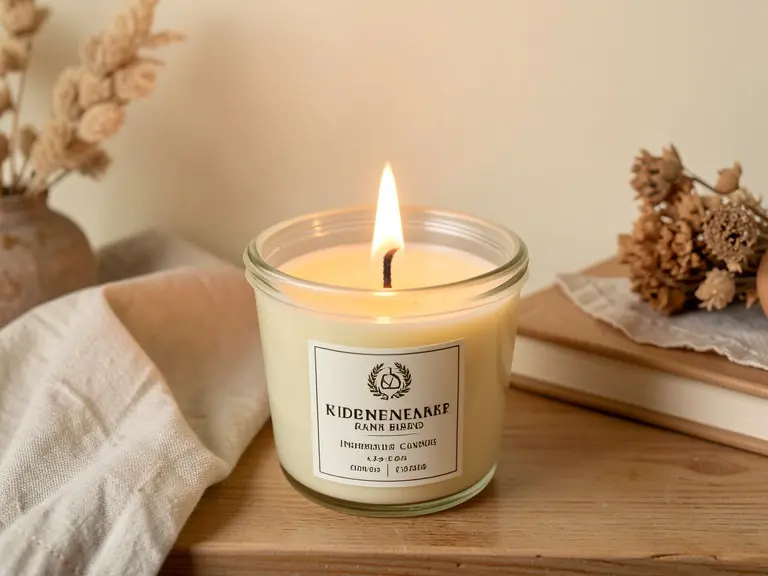
Try it on your own photo in Candle Photos →The before photo is a phone-style snapshot of a generic product that we made with an AI image model for this page; it is not a customer photo. The after is the unedited result of our own free tool on that photo, made on 21 October 2026 at the size a visitor gets and shown without the download mark. One run, one result: yours will differ.
The candle itself was fine. The photo was the problem. Flat overhead light made the wax look like a pale block, the jar picked up the clutter around it, and a toaster and a stack of letters sat right behind the product. A buyer scrolling past would read this as a kitchen photo, not a candle.
Candle shots have a particular trap. An unlit candle in a clear jar has no glow and no mood, and mood is most of what a buyer is shopping for. That is why so many candle listings use a lit flame and a warm surface.
We picked the lit, cozy-evening look in the candle photo tool and left everything else alone. The tool kept the jar shape, the clear glass and the cream wax, put a single small flame on the one wick, and moved the jar onto a wooden shelf with a folded linen cloth, dried stems and the edge of a book.
The clutter is gone, the warm light makes the wax look softer, and the flame gives the picture a reason to exist. It is still one candle with one wick, which is the part that matters for an honest listing.
Printed text is the weak spot of image models in general, and one of the sources we read for this page (Figma) calls out tiny label text as a common failure. We left the label problem in plainly rather than crop it out, because a shopper who receives a differently printed candle will not care how the photo was made.
Free tools for this
FAQ
In this example the jar shape, the clear glass and the cream wax stayed the same and a flame was added to the single wick. It is still one example, so compare your own result with the real candle before you use it.
The jar in the before photo had no label, so the model invented one. If your candle already has a label, the tool is asked to keep it, but small printed text is the part most worth checking.
Yes, the lit look was the request here. Ask for an unlit candle instead if your listing says the candle ships with an untrimmed wick, or if you want a calmer look.
No. This page is one worked case. The step-by-step version, with lighting and angles for shooting candles yourself, is in the candle photography guide linked below.
Z Product AI makes the tools shown here. Third-party pages above were read for general background on what to check in AI product photos as of 21 October 2026.