The exact requestFront view, light grey studio Do not add any text, label or logo that is not already on the product.
Try it on your own photo in Handbag Photos →Before and after
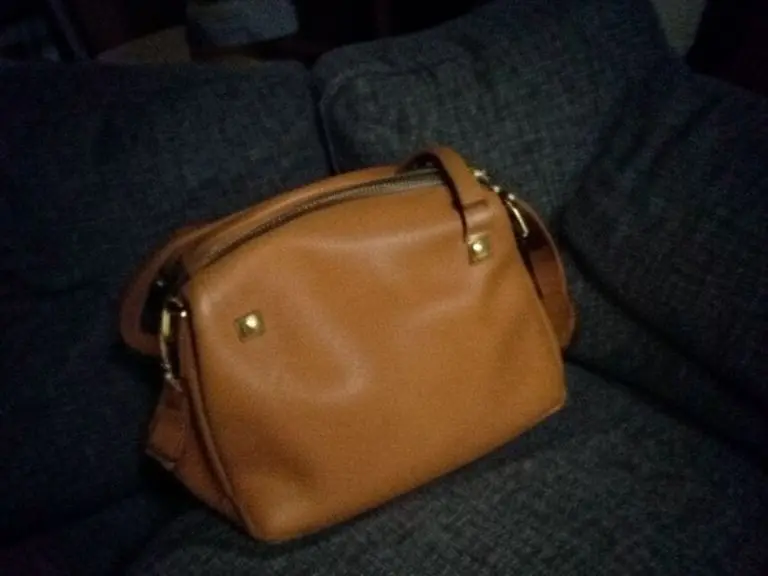
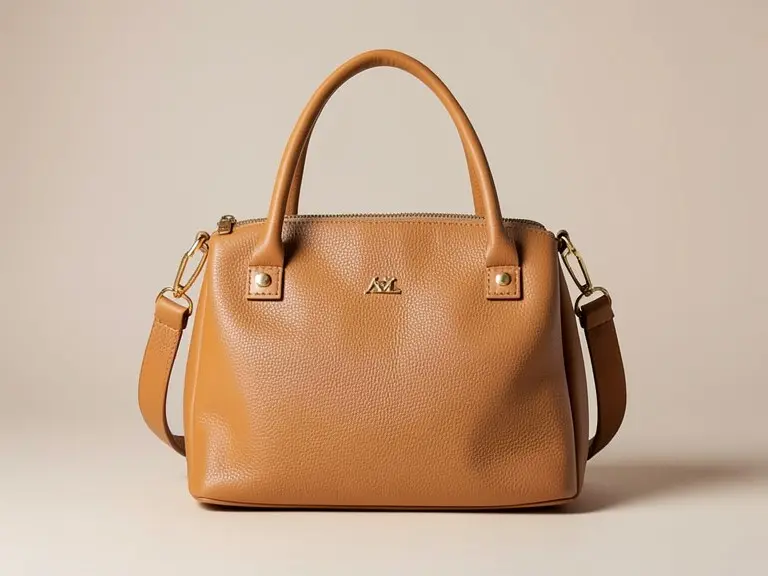
A tan leather bag with gold hardware, photographed slumped on a sofa in dim light, and the same bag after one request for a front view on a studio background. The result is good, and it is also a reminder that bags are easy to over-restyle.
Made 21 October 2026
The exact requestFront view, light grey studio Do not add any text, label or logo that is not already on the product.
Try it on your own photo in Handbag Photos →The before photo is a phone-style snapshot of a generic product that we made with an AI image model for this page; it is not a customer photo. The after is the unedited result of our own free tool on that photo, made on 21 October 2026 at the size a visitor gets and shown without the download mark. One run, one result: yours will differ.
Shoppers judge a handbag by its shape, its leather and its hardware. On the sofa, the bag slumped, the dark fabric swallowed the lower half and the straps vanished into the cushions. You could tell it was brown and that was about all.
The usual advice for bags is to show the full shape standing up, from the front, against a plain background, then add detail shots.
We asked for a front view on a light grey studio. The bag now stands upright and square to the camera, the tan leather shows an even grain, the gold hardware catches a little light, and the background is a smooth, plain wall.
One small mismatch: we asked for light grey and the wall came back as a warm greige. It is clean and plain, so it works, but it is not what we named. Asking for white or a specific color is the safer way to control the backdrop.
The original showed one short handle and a corner of hardware. The after shows two tall top handles, a thin shoulder strap with gold clips and a small metal logo on the front. Those are plausible bag parts, and that is the risk: they look right, and they are not evidence of your bag.
Use the studio result as the first image only if every visible part matches the real bag. If one detail is off, regenerate or keep a plain, honest phone photo for that slot. Returns come from bags that looked different from the listing, and a polished image does not make up for that.
Free tools for this
FAQ
It is meant to keep the product, but in this example it added two handles, a strap and a front logo that the original photo only hinted at. Always compare the result with the real bag.
The model treats a style request as guidance, not an exact color match. If the backdrop color matters, name it plainly, for example white, and check the result.
Yes, any phone photo works as input. Better light and a visible full shape give the model more to work from.
In the handbag photography guide linked below, which covers the angles, the stuffing and the detail shots.
Z Product AI makes the tools shown here. Third-party pages above were read for general background on what to check in AI product photos as of 21 October 2026.